Run the draw
Drawing the winner — the big moment, and why it's safer than it feels.
This is the step organisers are most nervous about, so let's be clear up front: the draw is deliberate, confirmed, and yours to run when you're ready. RaffleLink never draws early, and never by accident — nothing happens until you press the button and confirm.
If being at a computer at the draw time is the hard part, you can choose to let it run itself — see Automatic draw. That's opt-in and off unless you turn it on.
Before you draw
Make sure:
- Your raffle is closed (sales have ended — see Close your raffle).
- You're ready — once drawn, the winner is selected and recorded. There's no casual "undo."
There's no rush. The raffle will sit in awaiting draw for as long as you need.
How to draw
- Open the Draw & Timeline tab.
- Choose Start Draw.
- Confirm when prompted. This confirmation is your safety net — nothing happens until you say yes.
RaffleLink selects the winning ticket(s) at random from all valid tickets in the draw, and records the result.
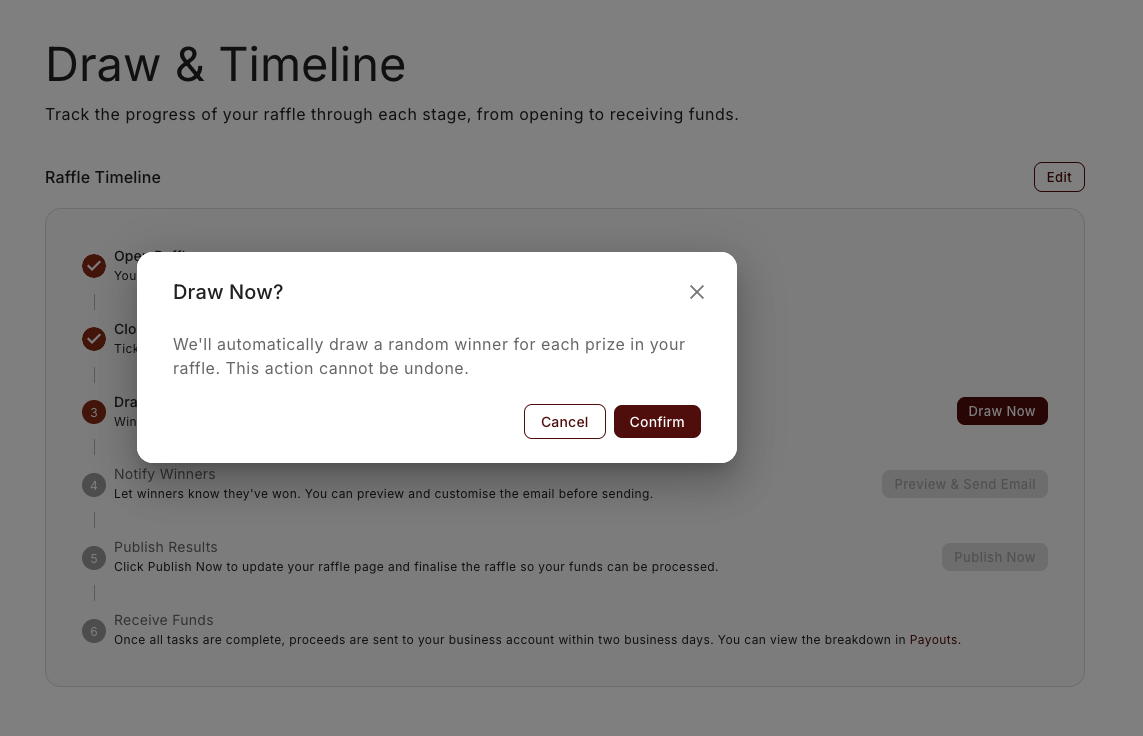
Why it waits for you
By default, RaffleLink won't draw a winner on its own. That's intentional, and it's the thing that makes the draw feel safe: you get time to check everything over — that the right tickets are in, that any voided orders are settled, that you're genuinely ready — before a winner is locked in. The draw waits for a real person to decide it's time.
If the hard part is simply being at a computer at the draw time, you don't have to give that up. You can turn on an automatic draw ahead of time: it runs at your advertised draw time, applies every one of the same checks, and stops rather than forcing anything if something looks wrong. It stays off unless you switch it on.
Running a different kind of draw?
This page covers the standard Instant draw, where RaffleLink picks the winners for you. There are a few variations:
- Letting it draw itself. For an online-only raffle with an instant draw, you can turn on an automatic draw so it runs at your advertised time without you. See Automatic draw.
- Drawing by hand. Prefer to pull winners from a hat at your event? Choose a Hat (or Combined Hat) draw method and enter the winners yourself. See Draw by hand.
- Early bird prizes. If you set up early bird prizes, there's a separate draw to run partway through the raffle first — and your final draw stays locked until it's done. See Run the early bird draw.
- Paper tickets. If you sold paper tickets alongside online ones, the draw works the same way but pauses for you to record the real stub whenever a paper ticket wins. See Run a hybrid draw.
After the draw
Once drawn, you'll see the winning ticket(s) and the winner's details on the Winners tab. Your one remaining step is to publish the results — that's what puts the winners on your raffle page and finalises your payout. Emailing your winners is optional and can happen before or after. You can also choose Download PDF for a record of the results for your files, and you'll get a confirmation that the draw is complete.
If the draw button won't run
Two checks can hold the draw back. Both are there to stop a result you'd have to undo.
Unpublished changes. If you've edited the raffle but haven't published those edits, the draw is blocked and you'll see: "You have unpublished changes in [section]. The draw only uses what has been saved, and prizes lock once it runs. Publish or discard those changes before you draw." The button itself explains the same thing on hover: "Publish or discard your unpublished changes before drawing." Head to the section named, publish or discard, and the draw opens up. (Leaving the raffle with unpublished changes now asks you to confirm first, so you don't lose them by accident.)
A purchase still in flight. RaffleLink won't draw while someone's checkout is still running, because those tickets are in the pool but not yet paid for. You'll see "A ticket purchase is still being completed ([n] tickets reserved but not yet paid). Please try again in [n] minutes, once that checkout has finished or its reservation has expired." Wait the few minutes and draw again. If instead you're told that unpaid tickets "from an expired checkout" are still holding a place and to contact RaffleLink support, please do — that one needs us to clear it, and it won't resolve on its own.
Hat and combined-hat draws aren't affected by the second check, since you're entering the winners yourself.
Drawing is final
A completed draw selects and records the winner — it's not something you can quietly redo. If something genuinely went wrong (a winner was a voided order that wasn't settled, say), don't try to work around it — contact support@rafflelink.com and we'll help you sort it out properly.